![[ image: nothing]](../furniture/nothing.gif)

|
|
|
GENERAL |
|
Front Page |
|
 Pipedream |
|
|
|
|
Z88 |
|
 |
|
Z88 |
|
Hardware |
|
 Spares Spares |
|
Software |
|
Shows |
|
Programmer's Section |
|
Quick Guide |
|
Reviews |
|
GDPR |
|
Help & FAQ |
|
Z88 2nd User Section |
|
|
|
|
EXTRA |
|
Site map |
|
| Feedback Help |
|
|
|
 |
|
|
ARCHIVE SECTION |
|
|
GENERAL |
|
Adverts |
|
BBC BASIC |
|
Books |
|
Computer Fairs |
|
Flying Page |
|
PC |
|
|
|
|
NEWS |
|
Mailshot Promotions |
|
PC Newsletter |
|
 |
|
|
|
|
Z88 |
|
Z88 |
|
Hardware |
|
Software |
|
|
|
Saturday, 11-Apr-2026 10:48:39 BST
Z88 Help & FAQ
Mac Link
![[Picture of Z88 & Mac with cable]](../images/maclink.gif) |
| Apple Mac being used with Z88 to transfer files easily |
Mac Link allows you to transfer and convert files in both directions from a Z88 to a Macintosh Plus, Macintosh SE or Macintosh II (as well as the later models). Files are saved as ASCII, or translated into MacWrite files which are accepted by Microsoft Word, Word Perfect, WriteNow, Fullwrite Professional and Lotus 1-2-3, and can be imported into Pagemaker, Quark Xpress and Ready Set Go!
Supplied with the Mac Link ROM (32K EPROM pack),a 3½" disk, a 9-to-8 pin min DIN cable and user manual.
Mac Link program download
Z88-to-Mac program
Some Mac users have found they are unable to read files on the disk with the latest machines. This download is version 1.1 of the Z88-to-Mac program for transferring files from your Z88 to your Mac. To use it you will need the Z88 to Mac ROM installed in your Z88, as well as a Mac link cable.
It is a Classic Mac program, so will run on both Mac OS 7.x to 9.x as well as running in OS X under the Classic environment.
The file is encoded
as a self-extracting Stuffit archive 
( Z88-to-Mac.smi.sea) of a self-mounting image (.smi). If
this doesn't work, try download the enclosed zip file with Z88-to-Mac.sit
enclosed.
After downloading it, simply double-click the file and it will automatically decompress itself and mount on the desktop. Once it has mounted, drag the program to your hard drive to install it.
For help on how to use the program, please consult the manual that came with the ROM.
USB - Mac Serial Adapter
 |
| Keyspan USB Serial Adapter for MAC |
Carry on using your MAC Link with the latest MAC with this serial adapter. Comes complete with USB Device cable, Mac Driver CD, and user guide. When you order this from us, you get the MAC Link FREE!
The installer will not run unless you have the MAC OS USB version 1.1 (or later)
Download the latest drivers now.
Configuring a Keyspan serial adapter under Mac OS 9
Install the drivers
The first step is to install the Keyspan serial adapter drivers. These should be on the CD that came with the adapter. You can also find them on the Keyspan web site (the web site's version of the file may be more recent than the one included on your CD).
http://www.keyspan.com/downloads/mac/
To install the drivers from the CD, simply double-click the Install Keyspan USA28X file and follow the instructions.
If you have downloaded the updated drivers from the Internet, you must first decompress the Stuffit archive that they came in. If you don't have Stuffit Expander (it should have been installed when your Mac OS was installed), you can get it from the Aladdin Systems site.
http://www.stuffit.com/cgi-bin/stuffit/stuffit_loginpage.cgi?standardmacexp
Once you have decompressed the archive, you can double-click the file and follow the instructions.
Configure the adapter
To configure the adapter, you need to open the Keyspan Serial Assistant, open the Keyspan USA-28X Manager, and then configure the correct port. To do this:
- Open the Control Panels folder by selecting Control Panels from the Apple menu.
- Open Keyspan Serial Assistant by double-clicking the Keyspan Serial Assistant Control Panel.
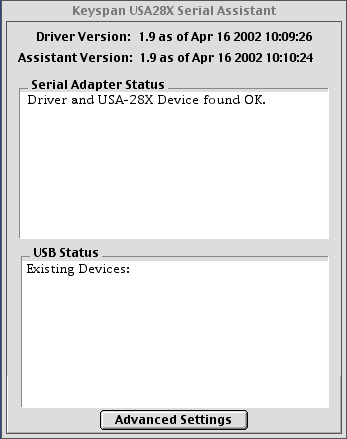
- The Keyspan Serial Assistant
opens and shows you its current status. If you do not see Driver and USA-28X Device found OK, you should
consult your Keyspan adapter manual under Troubleshooting.
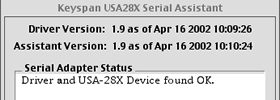
- To configure your adapter's
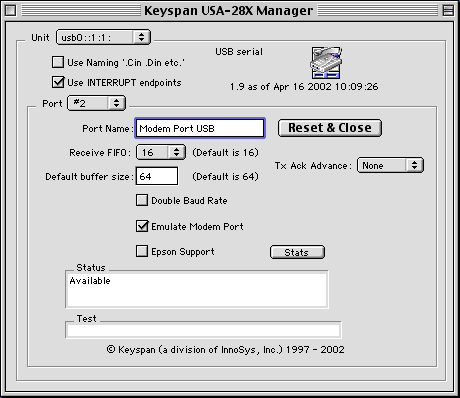
ports for connecting to your Z88, open the Keyspan USA-28X
Manager by clicking the Advanced Settings button.
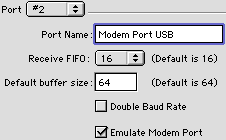
- Select #2 in the Port drop-down list, as this is the port that emulates the modem port on the adapter. Z88-to-Mac was programmed to connect to the modem port on older Macs. As the more recent Macs lack a serial port, the adapter must fool the program into seeing its port as the modem port.
- Select the Emulate Modem Port option so that the adapter tells Z88-to-Mac that the modem port is available.
- Reset the adapter and close the serial port by clicking the Reset & Close button. This configures the adapter with your new settings.
- Close both the Keyspan USA-28x Manager and the Keyspan Serial Assistant.
- You need to unplug the Keyspan adapter and then plug it back in again, as it reconfigures its ports when it is plugged in.
Plug the Z88 in
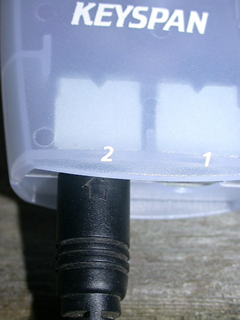 |
The Keyspan driver
is set up to send information to port 2 on the adapter, so plug
the Z88 serial cable into the port marked 2 on your adapter.
You are now ready to start Z88-to-Mac
and transfer your files. 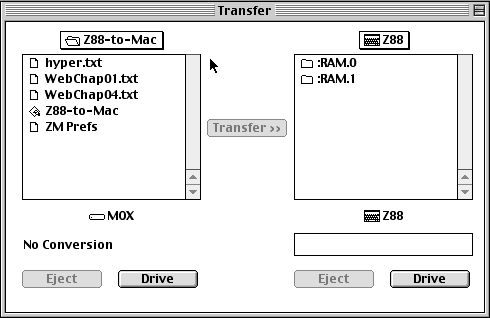 |
 |
![[Ranger Computer's logo]](../images/rlogo.gif) |
Vision/L
Vision/L is a VT 100 terminal emulator and provides an RS-232-C interface with communication speeds up to 38,400 baud.
Display
Data is displayed on the Z88 screen (80 character 8 line) which acts as a 'window' into an internal 24-line VT100 screen. The user can move the 'window' using the cursor keys, and also choose whether the window automatically follows incoming data or remains fixed at a constant point in the internal screen.
The full 24 line screen is constantly visible as a 'pixel map,' a miniature representation of the full 24-line screen complete with a cursor showing the current window position.
Keyboard
The full size VT100 terminal has more keys than are available on the Z88. Vision/L emulates these extra keys by using the Z88 <> and [] keys.
Function keys are obtained by using the [] key. This displays the Z88 keyboard layout with the function name for each key. Pressing any key then emulates the selected function.
The VT100 keypad keys are also available to the user at any time by pressing the <> key in conjunction with the relevant keypad key.
Emulation Features
The DEC VT100 terminal represents a de-facto standard for screen formatting and keyboard interpretation and is available as an interface option on a vast number of mainframe, mini and micro-computer hosts. The standard is also used widely in specialised electronic equipment where external interrogation is required.
The VT100 interface consists of commands, or 'escape code sequences,' that are inserted into the normal data stream in order to instruct the terminal on how and where to display data. these sequences also control other functions in the terminal, like for instance the character codes to be returned when certain keyboard keys are pressed.
Wherever practical, Vision/L behaves in response to these commands exactly as a VT100 terminal would. In cases where a particular command is not supported, Vision/L recognises, but does not respond to, the command. Commands are not supported because they are impractical in the Z88 hardware, like smooth scroll, for instance.
RAM required
Vision/L will only run in an EXPANDED Z88, so you need at least a 128K RAM pack installed.
|
Z88 - Mobile Phone
 |
| [GS18 phone] |
The Z88 Ericsson GS18 cable
To connect the Z88 to the Ericsson GS18 we use
- the shipped serial cable, ('GS18' specific connector to a standard DB-9 serial female connector for a PC on the other end).
- and a DB-9 serial male adapter cable to the Z88.
Disclaimer: We can't be help responsible if anything go wrong (if you damage your Z88, GS18 or cables) after you decide to apply the following instructions. OTOH, it worked for Paul Gibbs, so it's up to you...
Parts needed:
- 1 moulded lead with 9 pin male ‘D’ type connector on one end (for the Z88)
- 1 9 pin male ‘D’ type connector and hood
of course you'll also need a soldering iron, screwdriver, cutter, etc...
The key point is which wire goes on which pin of the connector, so here's a diagram to explain:
|
(moulded lead) |
|
(connector & hood) |
|
|
|
|
|
|
|
|
|
|
|
|
|
|
|
|
|
|
|
|
|
|
|
|
|
|
|
|
A few words of explanations: Join the wires that come from pins 5, 8 and 9 on the Z88 and connect them to pin 4 to the GS18.
|
![[Wordmonger's logo]](../images/wmong.gif) |
Z-Term
Z-Term supports DUMB, Hayes or MIRACLE modems.
Forget using the Z88's limited terminal application. Z-Term can be used with auto-dial modems and to transfer files to computers.
Speeds of 75, 300, 600, 1200, 1200/75 (V23), 2400, 9600 and 19200 can be selected.
Teletype or Viewdata (for PRESTEL) modes are supported together with the Baud rate, delay times, parity settings (Even Odd None Mark Space) and function key assignments for each telephone number stored.
A 'tape-recording' facility can be used to record what is displayed on the screen when 'on-line' for later scrutiny or printing. Files can also be prepared off-line and sent when required.
The program can store up to five telephone numbers and Log-On strings, allowing easy access to bulletin boards, CompuServe and other off-line services. Xmodem file transfer protocol is also provided so that files can be transferred (with a suitable cable) to other computers that have a terminal program and Xmodem already installed.
Other commands and facilities include
- Break (break of transmission for 100 milliseconds)
- Off - disconnects
- Save frame
- Sending Control Characters
|
|
Z-Tape
Z-Tape saves and loads files from the Z88 using a cassette tape recorder.
![[Z-Tape]](../images/ztape.gif) |
Instead of using an EPROM use a cassette tape instead.
- Extend Z88 storage inexpensively.
- PC Independent.
- Flexible.
- Simplify archiving.
Z-Tape is modelled on the Z88 Filer pop down. Saving to tape is as easy as saving to EPROM.
Restoring from tape is easier than from EPROM using the Filer. All files may be restored, or a single file may be specified.
A Verify routine is included to check file integrity once it is saved.
For best results the recorder should be simple, without any tone controls and run on at least four 1.5v batteries. The connecting lead from the Z88 to the cassette recorder (which has two 3.5mm plugs on it - for the microphone and earphone sockets) is extra.
|
Z88 Computer Links & OZ 4.7 upgrade *
| Description | Price | VAT | Total |
|---|---|---|---|
| PC AT 9/25 way Serial Cable | £7.50 | £1.50 | £9.00 |
| PC AT 9/9 way Serial Cable | £20.83 | £4.17 | £25.00 |
| Z88 Serial Link |
£16.67 | £3.33 | £20.00 |
| PC-Link 2 (Cambridge) | £29.17 | £5.83 | £35.00 |
| * EazyLink or OZ 4.7 upgrade | £25.00 | £5.00 | £30.00 |
| PC Link 2 to EazyLink upgrade (ROM only for MAC users) | £8.33 | £1.67 | £10.00 |
| MAC Link or PC-Link 2 ROM only (Cambridge) | £20.00 | £4.00 | £24.00 |
|
|
|||||||
![[Click here to send e-mail for real-time pricing]](../images/click_prices_328.gif) |
|||||||
 | ![[ Top of Page ]](../images/top_of_page.gif) |

|
|||||
 ![[ Front Page ]](../images/home1.gif) |
![[ BBC BASIC ]](../images/bbc_basic.jpg) |
![[ Z88 Section ]](../images/z88.gif) |
![[ PC Section ]](../images/pc.gif) |
||||
| ©
[Rakewell Limited 1998 - Sep 2025] Rakewell 2025 - ? |
|||||||
|
 |
| Click here to search on this site |
|
|
|
|
| Web Highlights | ||
| BBC BASIC for Windows | ||
| Flight Page | ||
| Z88 Section | ||
| Adverts Section | ||
![[ new ]](../furniture/updated.gif) Jamie's 2020 Review |
||
|
||
|
|
||
| Z88
Com Links section Eazylink2 Z88 9/9 way Serial Cable Z88 Serial Link Spare Spare |
||
|



|
|
||
| We
ship to other countries - USA - Hong Kong - Europe See Price list page for details. |
||
|
||
|
||
|
Vic Gerhardi Banking Details
|
||
|
||

|
| |||||||
