![[ image: nothing]](../furniture/nothing.gif)

|
|
|
GENERAL |
|
Front Page |
|
 Pipedream |
|
|
|
|
Z88 |
|
 |
|
Z88 |
|
Hardware |
|
 Spares Spares |
|
Software |
|
Shows |
|
Programmer's Section |
|
Quick Guide |
|
Reviews |
|
GDPR |
|
Help & FAQ |
|
Z88 2nd User Section |
|
|
|
|
EXTRA |
|
Site map |
|
| Feedback Help |
|
|
|
 |
|
|
ARCHIVE SECTION |
|
|
GENERAL |
|
Adverts |
|
BBC BASIC |
|
Books |
|
Computer Fairs |
|
Flying Page |
|
PC |
|
|
|
|
NEWS |
|
Mailshot Promotions |
|
PC Newsletter |
|
 |
|
|
|
|
Z88 |
|
Z88 |
|
Hardware |
|
Software |
|
|
|
Wednesday, 14-Oct-2026 01:15:16 BST
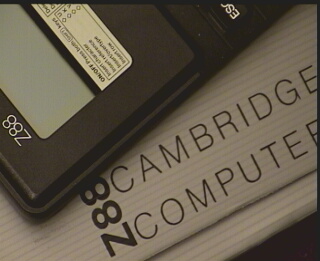
Z88 Hardware


 |
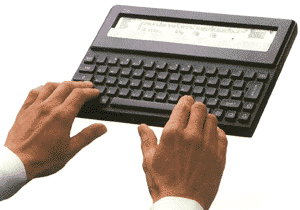
This Capable
Z88 Technical Specification
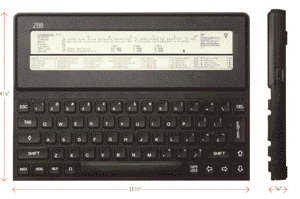
Design Four-chip design - CPU, ROM. RAM, gate array.
CPU Z8O (CMOS).
ROM 128K containing operating system and applications software
together with BASIC/Assembler.
RAM 32K expandable via 32K, 128K 512K and 1 megabyte to
a maximum 3 megabytes, battery-backed from the computer.
EPROM/FLASH EPROM Up to 3 megabytes removable storage capacity
via 32K, 128K 256K and 1 megabyte packs.
Applications software Pipedream word-processing and spreadsheet
applications. Database. Calculator, diary, calendar, clock, alarms,
printer editor, come as pop-down' screens.
Operating system Oz operating software, (v2.2 or 3.0) allows task-switching between
applications without loading or exiting.
Language/Assembler Powerful BASIC.
Display 8 x 10⁶ characters superIwist' LCD. Includes 8 x 80 working
area, page map (shows where you are on a complete page), battery
strength, alarm status.
Power 4 AA batteries provide 20 hours active computing
or one year on standby.
Ports Three for memory-pack expansion, RS232 for popular
printers and data import/export.
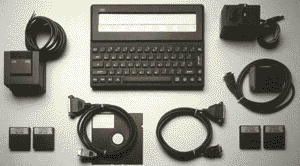
Z88 Accessories
RAM Packs
Require no external power,
and are available with 32K and 128K 512K and 1 megabyte capacity.
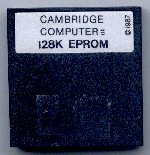
EPROM Packs Solid-state
permanent storage, available in 32K, 128K and 256K. 1 megabyte
FLASH EPROM packs available NOW.
EPROM Eraser Z88 EPROM Eraser, completely
deletes EPROM data - leaves you with a blank EPROM pack, ready
for re-use.
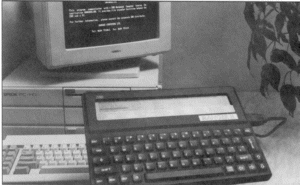
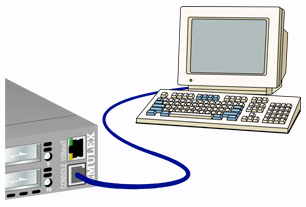
PCLINK Consisting of software diskette
and RS232 serial cable, allows transfer and receipt of ASCII files
between the Z88, and an IBM or compatible PC. Also converts Z88
Pipedream files into either Wordstar or Lotus 1-2-3 files.
Links for other computers available.
Serial Printer Cable
Connects the
Z88 to any printer with a standard serial port.
Parallel Printer
Cable connects
the Z88 to any printer with a standard parallel port.
AC Adapter helps preserve battery life,
and is useful when the Z88 is in constant use in a fixed position.
|
|
|
|
|||||||||||||||||||||||||||||||||||||||||||||||||||
| RAM and Flash Cards? | |||||||||||||||||||||||||||||||||||||||||||||||||||||
How to decide what to getThe Z88 comes with 32K RAM 'built-in' memory. This is just enough to try out the examples given in the manual before you run out. If you want to use your Z88, you need more RAM because it uses RAM as working memory and for storing files. RAM gets used for everythingYou should use other devices to back your files up, but the first need to be stored in RAM otherwise you are unable to get them to the other devices.
Expanded machineRAM should be added (in slot 1 (or slot 2 if using OZ 4.x)) initially. This makes the Z88 an 'expanded' machine, the preferred configuration.
|
The Z88 uses some of the extra RAM for itself internally for Applications and BBC BASIC. You will quickly discover that you need more RAM than you think. The following example assumes using a 20K document in Pipedream with a 128K RAM Pack.
Remember If you have not got enough space to save the file to RAM, you will not be able to save it to the EPROM Pack or transfer the file to another computer. Note If you put your RAM in slot 2 then the Z88 will not be an expanded machine. FLASH cards
|
||||||||||||||||||||||||||||||||||||||||||||||||||||








|
Sick Z88 & Advice
Is your Z88 not working, or at least not working properly? Has it lost all your files again?
We hold limited stocks of Z88 parts and can get you running again. Give us a call. With the Z88 at a new low price it is often more cost-effective to buy a spare machine.
REMEMBER we are computer consultants who can HELP YOU to use Z88's (and other computers) in most applications.
|
Z88
| Description | Price | VAT | Total |
|---|---|---|---|

Cambridge Z88 Computer Only |
NONE LEFT |
||
|
Cambridge Z88 Computer Only (2nd User - no warranty) |
See 2nd
hand Section or call for avaiability. |
||
| STARTER PACKS NO LONGER INCLUDE THE Z88 THESE PRICES ARE CURRENTLY BEING UPDATED |
|||
|
1M/1M |
£157.50 |
£31.50 |
£189.00 |
|
Cambridge Z88 Flash Starter Pack with OZ4.7 upgrade |
£182.50 | £36.50 | £219.00 |
    Cambridge Z88 Flash Starter Pack with OZ4.7 upgrade |
£202.50 | £40.50 | £243.00 |
|
Cambridge Z88
Starter Pack
|
£157.50 | £31.50 | £189.00 |
|
|
|||||||
![[Click here to send e-mail for real-time pricing]](../images/click_prices_328.gif) |
|||||||
 | ![[ Top of Page ]](../images/top_of_page.gif) |

|
|||||
 ![[ Front Page ]](../images/home1.gif) |
![[ BBC BASIC ]](../images/bbc_basic.jpg) |
![[ Z88 Section ]](../images/z88.gif) |
![[ PC Section ]](../images/pc.gif) |
||||
| ©
[Rakewell Limited 1998 - Sep 2025] Rakewell 2025 - ? |
|||||||
|
 |
| Click here to search on this site |
|
|
|
|
| Web Highlights | ||
| BBC BASIC for Windows | ||
| Flight Page | ||
| Z88 Section | ||
| Adverts Section | ||
![[ new ]](../furniture/updated.gif) Jamie's 2020 Review |
||
|
||
|
|
||
| Z88
Hardware section Batteries Card Case Mk 2 Carrying Case EPROM Erasers 1M Flash Card 512K Flash/RAM Card Using 2 Flash Cards Keyboards Mains Adapter PCB (blank) Power Supply Printers & Cables RAM RAM - Low Power RAM and Flash Cards ROM Images Using the PC to print Z88 - Details Z88 - Special Order Z88 - Tech Spec |
||
|
|
||
|
Z88 Wiki Z88 Developers'
Notes V4.3
|
||
|
||



|
|
||
| We
ship to other countries - USA - Hong Kong - Europe See Price list page for details. |
||
|
||
|
||
|
Vic Gerhardi Banking Details
|
||
|
||

|
|
|||||||
