![[ image: nothing]](../furniture/nothing.gif)

|
|
|
GENERAL |
|
Front Page |
|
 Pipedream |
|
|
|
|
Z88 |
|
 |
|
Z88 |
|
Hardware |
|
 Spares Spares |
|
Software |
|
Shows |
|
Programmer's Section |
|
Quick Guide |
|
Reviews |
|
GDPR |
|
Help & FAQ |
|
Z88 2nd User Section |
|
|
|
|
EXTRA |
|
Site map |
|
| Feedback Help |
|
|
|
 |
|
|
ARCHIVE SECTION |
|
|
GENERAL |
|
Adverts |
|
BBC BASIC |
|
Books |
|
Computer Fairs |
|
Flying Page |
|
PC |
|
|
|
|
NEWS |
|
Mailshot Promotions |
|
PC Newsletter |
|
 |
|
|
|
|
Z88 |
|
Z88 |
|
Hardware |
|
Software |
|
|
|
Saturday, 11-Apr-2026 12:38:41 BST
Z88 Quick Guide
|
|
|
|||||||||||||||||||||||||||||||||||||||||||||||||||||||||||||||||||||||||||||||||||||||||||||||||
|
|
|
|||||||||||||||||||||||||||||||||||||||||||||||||||||||||||||||||||||||||||||||||||||||||||||||||
 |
|||||||||||||||||||||||||||||||||||||||||||||||||||||||||||||||||||||||||||||||||||||||||||||||||||
|
|||||||||||||||||||||||||||||||||||||||||||||||||||||||||||||||||||||||||||||||||||||||||||||||||||
|
Every now and then, we upgrade and improve the applications that are supplied with the card. Whenever I notify users that a 'new' version is out I am greeted with words like |
I am not yet confident with burning app's to (flash) ROM's so last night and most of today I thought I would show you how easy it is! |
|
||||||||||||||||||||||||||||||||||||||||||||||||||||||||||||||||||||||||||||||||||||||||||||||||
|
|||||||||||||||||||||||||||||||||||||||||||||||||||||||||||||||||||||||||||||||||||||||||||||||||||
Minimum Requirements |
|||||||||||||||||||||||||||||||||||||||||||||||||||||||||||||||||||||||||||||||||||||||||||||||||||
|
The more RAM you have in your Z88 the better! If you have another RAM pack, use that in Slot 2. The files that are used are 16K, so with a 128K RAM you will only be able to have 3 of them at any one time before having to download some more. Z88 Computer Link, to download the new image files. It can be any type i.e. Mac Link Eazylink as long as you have the software for the Z88 end separately. |
||||||||||||||||||||||||||||||||||||||||||||||||||||||||||||||||||||||||||||||||||||||||||||||||||
|
|||||||||||||||||||||||||||||||||||||||||||||||||||||||||||||||||||||||||||||||||||||||||||||||||||
|
|||||||||||||||||||||||||||||||||||||||||||||||||||||||||||||||||||||||||||||||||||||||||||||||||||
|
|||||||||||||||||||||||||||||||||||||||||||||||||||||||||||||||||||||||||||||||||||||||||||||||||||
Getting Ready |
|||||||||||||||||||||||||||||||||||||||||||||||||||||||||||||||||||||||||||||||||||||||||||||||||||
|
|||||||||||||||||||||||||||||||||||||||||||||||||||||||||||||||||||||||||||||||||||||||||||||||||||
 |
|||||||||||||||||||||||||||||||||||||||||||||||||||||||||||||||||||||||||||||||||||||||||||||||||||
|
|||||||||||||||||||||||||||||||||||||||||||||||||||||||||||||||||||||||||||||||||||||||||||||||||||
|
|||||||||||||||||||||||||||||||||||||||||||||||||||||||||||||||||||||||||||||||||||||||||||||||||||
Programs,
Image Files
|
|||||||||||||||||||||||||||||||||||||||||||||||||||||||||||||||||||||||||||||||||||||||||||||||||||
ProgramsThere are two you can use. These are ROMCOMBINER which allows you to blow the full image onto your Flash Card. ROMupdate is easier to use but just updates a specific Z88 Application you already have. Image FilesROMCOMBINER image files are in blocks of 16K and have a number at the end to indicate what position they are in the Flash Card. |
Filename.63 is at the top and Filename.0 is at the bottom. ROMupdate image file is just a 16K file that gets replaced in your existing Flash card. ExampleI am going to use ROMCOMBINER and the 64K block that is supplied with the Flash card. Larger images can be blown using the same technique. All that changes is the number of 16K files that need to be downloaded and blown. |
||||||||||||||||||||||||||||||||||||||||||||||||||||||||||||||||||||||||||||||||||||||||||||||||||
|
|||||||||||||||||||||||||||||||||||||||||||||||||||||||||||||||||||||||||||||||||||||||||||||||||||
Fetch and Unzip Files |
|||||||||||||||||||||||||||||||||||||||||||||||||||||||||||||||||||||||||||||||||||||||||||||||||||
|
|||||||||||||||||||||||||||||||||||||||||||||||||||||||||||||||||||||||||||||||||||||||||||||||||||
|
|||||||||||||||||||||||||||||||||||||||||||||||||||||||||||||||||||||||||||||||||||||||||||||||||||
Transfer Files |
|||||||||||||||||||||||||||||||||||||||||||||||||||||||||||||||||||||||||||||||||||||||||||||||||||
|
|||||||||||||||||||||||||||||||||||||||||||||||||||||||||||||||||||||||||||||||||||||||||||||||||||
|
|||||||||||||||||||||||||||||||||||||||||||||||||||||||||||||||||||||||||||||||||||||||||||||||||||
Using ROMCOMBINER |
|||||||||||||||||||||||||||||||||||||||||||||||||||||||||||||||||||||||||||||||||||||||||||||||||||
 |
|||||||||||||||||||||||||||||||||||||||||||||||||||||||||||||||||||||||||||||||||||||||||||||||||||
|
|||||||||||||||||||||||||||||||||||||||||||||||||||||||||||||||||||||||||||||||||||||||||||||||||||
 |
[]B Start BBC BASIC RUN "ROMCOMBINER.BAS" |
||||||||||||||||||||||||||||||||||||||||||||||||||||||||||||||||||||||||||||||||||||||||||||||||||
|
|||||||||||||||||||||||||||||||||||||||||||||||||||||||||||||||||||||||||||||||||||||||||||||||||||
|
Put the Flash card that you want to change the Application into Slot 3. We are only going to change the top 64K sector of the Flash card, so there is no need to erase the whole card. Press F to select the command. |
We need to erase block 16 so type 16 followed by the return key. After seeing |
||||||||||||||||||||||||||||||||||||||||||||||||||||||||||||||||||||||||||||||||||||||||||||||||||
|
|
|||||||||||||||||||||||||||||||||||||||||||||||||||||||||||||||||||||||||||||||||||||||||||||||||||
|
|||||||||||||||||||||||||||||||||||||||||||||||||||||||||||||||||||||||||||||||||||||||||||||||||||
|
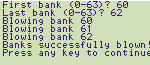
Press B to select the command. What EPROM type is in slot 3
FLASH As we haven't got the full ROM image in RAM we have to go for the Range of banks option. |
First bank (0-63) 60
Press the space bar to leave this. |
||||||||||||||||||||||||||||||||||||||||||||||||||||||||||||||||||||||||||||||||||||||||||||||||||
|
|||||||||||||||||||||||||||||||||||||||||||||||||||||||||||||||||||||||||||||||||||||||||||||||||||
| Select
the Filer []F <>ER ERASE |
Name
: FLZIP.* Confirm each file ? No |
||||||||||||||||||||||||||||||||||||||||||||||||||||||||||||||||||||||||||||||||||||||||||||||||||
|
|||||||||||||||||||||||||||||||||||||||||||||||||||||||||||||||||||||||||||||||||||||||||||||||||||
|
Now we can get the last file
|
Press -ESC- to get back to ROMCOMBINER.
|
||||||||||||||||||||||||||||||||||||||||||||||||||||||||||||||||||||||||||||||||||||||||||||||||||
End Loop
|
|||||||||||||||||||||||||||||||||||||||||||||||||||||||||||||||||||||||||||||||||||||||||||||||||||
| Follow the instructions as before but the banks are now | First bank (0-63)
63 Last bank (0-63) 63 |
||||||||||||||||||||||||||||||||||||||||||||||||||||||||||||||||||||||||||||||||||||||||||||||||||
|
|||||||||||||||||||||||||||||||||||||||||||||||||||||||||||||||||||||||||||||||||||||||||||||||||||
| Well thats it, just do a Hard Reset so that the temporary RAM is cleared out. | |||||||||||||||||||||||||||||||||||||||||||||||||||||||||||||||||||||||||||||||||||||||||||||||||||
|
|||||||||||||||||||||||||||||||||||||||||||||||||||||||||||||||||||||||||||||||||||||||||||||||||||
Blowing Larger Images
|
The only difference between doing the example above and Blowing larger images is that you need to go round the loop more often.
|
||||||||||||||||||||||||||||||||||||||||||||||||||||||||||||||||||||||||||||||||||||||||||||||||||
|
|||||||||||||||||||||||||||||||||||||||||||||||||||||||||||||||||||||||||||||||||||||||||||||||||||
More RAM = Less LoopsBefore starting this, it would be useful to know how many 16K files you can store on the Z88 before having to going round the loop again. |
The table below shows how many 16K files can be saved assuming 32K internal RAM.0 This includes the BBC BASIC programs required and using RAM.- as before so that every byte is used. |
||||||||||||||||||||||||||||||||||||||||||||||||||||||||||||||||||||||||||||||||||||||||||||||||||
|
|||||||||||||||||||||||||||||||||||||||||||||||||||||||||||||||||||||||||||||||||||||||||||||||||||
|
|||||||||||||||||||||||||||||||||||||||||||||||||||||||||||||||||||||||||||||||||||||||||||||||||||
ERASING SECTORSIn the above example it was easy to decide which sector that needed to be erased because it was a 64K block and it was an application. |
The table below shows the relationship between the 16K banks and the sector numbers that can be erased separately on the Flash card. If you are replacing the same area of an application, the file area may be left intact. |
||||||||||||||||||||||||||||||||||||||||||||||||||||||||||||||||||||||||||||||||||||||||||||||||||
|
|||||||||||||||||||||||||||||||||||||||||||||||||||||||||||||||||||||||||||||||||||||||||||||||||||
|
|||||||||||||||||||||||||||||||||||||||||||||||||||||||||||||||||||||||||||||||||||||||||||||||||||
Putting it all together |
|||||||||||||||||||||||||||||||||||||||||||||||||||||||||||||||||||||||||||||||||||||||||||||||||||
|
Let's have a look at a difficult example this time and see how to plan what to do and how it compares with the earlier example. Application 2005 image files consists of APP2005.0 |
to APP2005.21 and then another range APP2005.40 to APP2005.63 Using the tables above, we can use the following table to plan what to do. |
||||||||||||||||||||||||||||||||||||||||||||||||||||||||||||||||||||||||||||||||||||||||||||||||||
|
|||||||||||||||||||||||||||||||||||||||||||||||||||||||||||||||||||||||||||||||||||||||||||||||||||
|
|||||||||||||||||||||||||||||||||||||||||||||||||||||||||||||||||||||||||||||||||||||||||||||||||||
Blowing Banks in the right order |
|||||||||||||||||||||||||||||||||||||||||||||||||||||||||||||||||||||||||||||||||||||||||||||||||||
|
Now we have a plan, all that remains is to execute it.
<>PURGE or
|
|||||||||||||||||||||||||||||||||||||||||||||||||||||||||||||||||||||||||||||||||||||||||||||||||||
|
|||||||||||||||||||||||||||||||||||||||||||||||||||||||||||||||||||||||||||||||||||||||||||||||||||
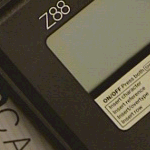 Z88
Z88 128K RAM in Slot 1
 Z88
Z88 1 - Backup Z88
 |
|
|
|||||||
![[Click here to send e-mail for real-time pricing]](../images/click_prices_328.gif) |
|||||||
 | ![[ Top of Page ]](../images/top_of_page.gif) |

|
|||||
 ![[ Front Page ]](../images/home1.gif) |
![[ BBC BASIC ]](../images/bbc_basic.jpg) |
![[ Z88 Section ]](../images/z88.gif) |
![[ PC Section ]](../images/pc.gif) |
||||
| ©
[Rakewell Limited 1998 - Sep 2025] Rakewell 2025 - ? |
|||||||
|
 |
| Click here to search on this site |
|
|
|
|
| Web Highlights | ||
| BBC BASIC for Windows | ||
| Flight Page | ||
| Z88 Section | ||
| Adverts Section | ||
![[ new ]](../furniture/updated.gif) Jamie's 2020 Review |
||
|
||
|
|
||
| Z88
Quick Guide section Introduction PC Link II Useful Pipedream commands Upgrading Flash Cards |
||
|
|
||
| We
ship to other countries - USA - Hong Kong - Europe See Price list page for details. |
||
|
||
|
||
|
Vic Gerhardi Banking Details
|
||
|
||

|
|
|||||||
